Last updated
How to quote a 120-unit apartment job in an afternoon
Quoting a 120-unit apartment job is fast because it isn't 120 kitchens — it's a handful of repeating unit types, loaded once with quantities and nested together. Gather the unit-type DXFs, load them with quantities, set slab size, kerf, edge offset, and rotation policy, run the nest, and read off a slab count and yield you can bid from. On the real Ridgeline Flats job — 108 units built from just 3 unit types — that process returned 132 slabs at 81.6% yield with a 0.133″ kerf, start to finish in one sitting.
Step 1: gather the unit-type DXFs, not 120 kitchens
The reason a 120-unit job doesn't take 120 takeoffs is that apartment and multifamily properties repeat a small number of layouts across many doors. A 108-unit property might be built from only 3 unit types — compact, mid, and large — each ordered dozens of times. Pull the DXFs your ERP or CAD already exports for each unit type; see from DXF export to slab count for what a clean import looks like. You are not redrawing anything — you're loading what you already have.
- Identify the repeating unit types from the floor plans or unit-type DXFs — typically 2–6 per property, up to 18 unit types on a licensed seat.
- Load each unit type once with a quantity instead of taking off every door individually. Ridgeline Flats loaded as 3 unit types across 108 units.
- Set the job parameters: slab size, kerf, 0.50″ edge offset, and rotation policy (Vein Flow aligned where the material calls for it).
Step 2: nest, read the count, and check yield
Once the unit types and quantities are loaded and the slab parameters are set, run the nest. StoneNest packs pieces from across unit types onto shared slabs — that's why the slab count isn't a simple multiple of unit count — and returns a slab count and yield percentage you can hand to a bid straight away. On Ridgeline Flats, nesting 108 units across 3 unit types returned 132 slabs at 81.6% yield, batched into ≤6-slab groups to match how the shop that built this actually loads a saw. See how many slabs do you need and slab yield explained for what drives those two numbers up or down.
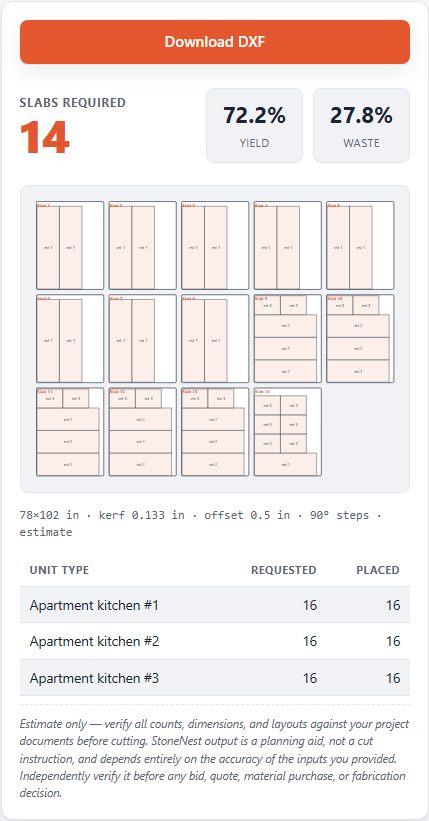
The Ridgeline Flats demo job after nesting: 132 slabs, 81.6% yield, ready to export.
Step 3: validate and export once, not after the fact
Before the slab count goes into a bid, the layout has to clear an independent validator that refuses to export a DXF with overlaps, off-slab pieces, or kerf violations — so the number you quote from is a checked number, not an eyeballed one. Once it passes, export the AlphaCAM-ready DXF (R2018) and move straight to programming. The free Estimator Mode covers the count-and-yield half of this without DXF import or export, for a quick manual gut check; the full workflow above, including DXF import and export, runs on a paid seat. Founders pricing is $69/mo for the first 25 seats, rate locked for the life of the subscription, then $99/mo; there's a 7-day free trial with no card required, and a 30-day refund on your first paid month if it doesn't fit your shop. See pricing for the full breakdown.
FAQ
How long does it actually take to quote a 120-unit apartment job?
As long as it takes to load a handful of unit-type DXFs with quantities and run the nest, not 120 individual takeoffs. On a real 108-unit, 3-unit-type job, that process returned a slab count and yield in one sitting.
Do I need a unique takeoff for every apartment door?
No. Multifamily properties repeat unit types across many doors, typically 2 to 6 types per property. You load each unit type once with a quantity, up to 18 unit types on a licensed seat.
What do I get before I commit to a paid seat?
A 7-day free trial with no card required, plus a free Estimator Mode for manual count-and-yield checks without DXF import or export, and the free web tool at /try/ for up to 3 unit types at up to 100 quantity each, computed in your browser.
Why does the slab count matter more than a square-footage estimate?
Because slabs pack pieces from multiple unit types together, and that packing plus kerf, edge offset, and yield is what the validator checks before it will let you export. A square-footage guess skips all of that.
Related guides
Multifamily Countertop Estimating
Why multifamily bids nest by unit type and quantity, not by multiplying one kitchen's square footage by the door count.
WorkflowFrom DXF to Slab Count
The mechanical path from the DXF your ERP or CAD already exports to a validated slab count and cut-ready file.
Import prepDXF Cleanup for Nesting
The pre-import checklist that keeps a DXF from failing silently.
Free estimatorTry It Walkthrough
What the three sample unit packages in Try It are, how to read the slab-count-and-yield results panel, and when a job needs the full validated desktop workflow instead.
See what your own job nests to
Try the free web estimator with your own unit counts, or start the 7-day free trial for full DXF import, export, and the validator gate.