Last updated
Estimating countertops for multifamily and apartment projects
Estimating countertops for a multifamily project means nesting a handful of repeating unit types — not hundreds of unique kitchens — across enough slabs to cover every unit, and the fastest accurate way to do it is to nest the real unit-type DXFs instead of multiplying one kitchen's square footage by the door count. On a real 108-unit job built from just 3 unit types (Ridgeline Flats), nesting the actual DXFs returned 132 slabs at 81.6% yield — a count that a single-unit-times-108 shortcut would have gotten wrong, because slabs pack pieces from different units together.
Why the unit-type shortcut matters
Most apartment and multifamily jobs repeat a small number of unit layouts across many doors — a 108-unit property might be built from just 3 unit types (compact, mid, and large apartment layouts), each ordered dozens of times. That structure is what makes multifamily bidding tractable: instead of taking off 108 individual kitchens, you take off 3 unit types once and set a quantity for each.
- Identify the repeating unit types from the floor plans or the DXFs your ERP/CAD already exports — typically 2–6 types per property.
- Set a quantity per type, not per door. StoneNest supports up to 18 unit types on a licensed seat, or 3 types at up to 100 qty each in the free web estimator.
- Nest all types together. Slabs commonly hold pieces from more than one unit type at once, which is why the count isn't linear with unit count.
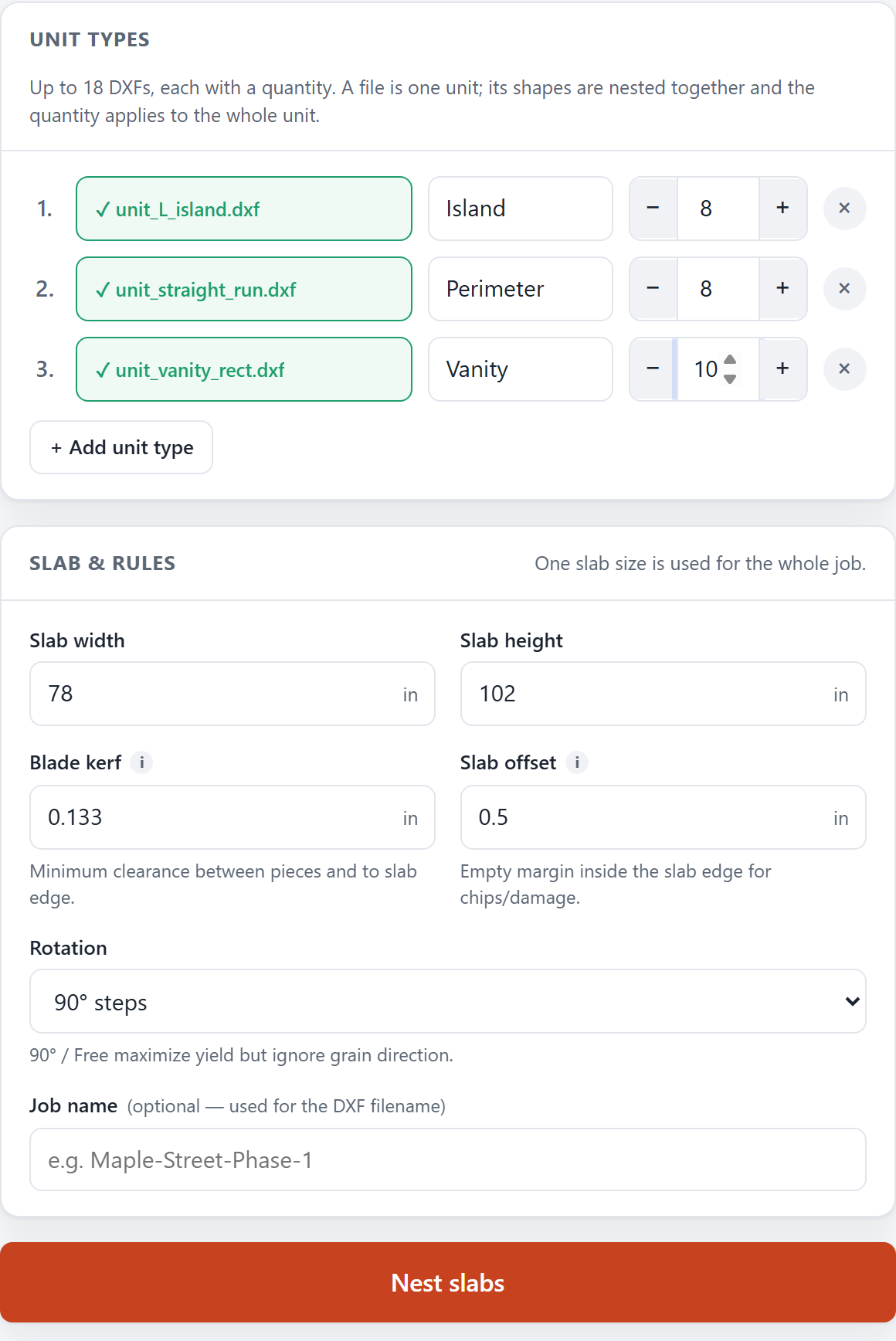
Three unit types and their quantities loaded for the 108-unit Ridgeline Flats job.
Why "one kitchen's sq ft × unit count" gets it wrong
Multiplying a single unit's square footage by the total unit count assumes every slab is used exactly as efficiently as one hypothetical unit's layout — but real nests share slabs across unit types, strand offcuts on oversized pieces, and lose material to kerf and edge offset in ways that don't scale linearly. On the 108-unit Ridgeline Flats job, the 3 unit types nested together into 132 slabs at 81.6% yield; a naive per-unit multiplication would not reproduce that number, because it doesn't account for how pieces from different units end up sharing slabs.
From unit types to a bid number
Once the unit types are nested, you have a slab count, a yield percentage, and a validated layout to bid from — and, on the desktop app, an AlphaCAM-ready DXF export once the layout clears the independent validator. See from DXF export to slab count for the full mechanics of that step.
FAQ
Why can't I just multiply one unit's square footage by the number of units?
Because nesting efficiency isn't linear per unit. Slabs commonly hold pieces from more than one unit type at once, and an oversized piece can strand offcut area that a per-unit average doesn't capture. On a real 108-unit, 3-unit-type job the actual nest returned 132 slabs at 81.6% yield — a number a simple multiplication would not reproduce.
How many unit types can StoneNest handle at once?
Up to 18 unit types on a licensed seat. The free web estimator at /try/ supports 3 unit types at up to 100 quantity each, ungated, computed in your browser.
Does StoneNest handle mixed piece types within a unit — islands, peninsulas, splash?
Yes. Each unit type is defined by its individual pieces (island, counter runs, splash strips, seamed sections), and quantities are set per unit type, not per individual piece.
What's the fastest way to start a multifamily bid?
Export the unit-type DXFs you already have from your ERP or CAD (see the from-DXF-to-slab-count guide), set quantities, and nest. No re-drawing is required — StoneNest reads the DXF you already produce.
Related guides
Quote a Multifamily Job Fast
A step-by-step run through turning a multifamily job into a defensible slab count in one sitting.
Production workflowThe 6-Slab Batch
Why production shops nest and cut a few slabs at a time, not the whole job at once.
Slab countHow Many Slabs Do You Need?
Why slab count isn't a flat square-footage ratio, and what actually drives the number on a real multifamily job.
Free estimatorTry It Walkthrough
What the three sample unit packages in Try It are, how to read the slab-count-and-yield results panel, and when a job needs the full validated desktop workflow instead.
Multifamily estimatingSlab Count by Building Size
Why a bigger building isn't a bigger multiplier: the method that sizes a 50-, 100-, or 200-unit job from its unit mix, walked through on a real 108-unit job.
Islands & supportIsland Overhangs & Support
The two standard numbers contradict each other: stone spans ~8in unsupported, and seating needs 12–15in. Every seating island is already past the limit.
See what your own job nests to
Try the free web estimator with your own unit counts, or start the 7-day free trial for full DXF import, export, and the validator gate.