Last updated
The 6-slab batch: how production shops actually cut
Production shops don't lay out and cut an entire job at once — they work in batches of up to about 6 slabs at a time. That's not a software limitation, it's how slabs actually move: staged near the saw a few at a time, cut, checked, and cleared before the next batch comes off the rack. StoneNest's nesting engine is built around that same ≤6-slab batch window instead of pretending a 108-unit, 132-slab job gets laid out on one imaginary floor.
Why shops don't nest a whole job at once
Walk a fabrication floor mid-run and you won't see 132 slabs staged in one place waiting on a single layout decision. You'll see a handful — usually up to about 6 — pulled, leaned, and queued near the saw, because that's what fits the staging rack, what the crew can move safely in one pass, and what keeps a mis-cut contained to a few slabs instead of an entire job. A 108-unit job like Ridgeline Flats still nests to 132 slabs at 81.6% yield, but no shop physically stages all 132 at once. See the full breakdown in the slab count guide.
Batching also keeps material risk small. If a batch of 6 comes up short or a piece gets damaged on the saw, you're re-cutting a handful of slabs, not re-nesting the job. That's a cost and time difference that matters on multifamily-scale counts — see the multifamily estimating guide for how that scales across dozens of unit types.
How StoneNest is built around the batch window
StoneNest nests to a ≤6-slab batch window because that's how the shop that built it actually runs jobs — not as an arbitrary limit, but because it matches how slabs get staged, moved, and cut on the saw. Each unit type's pieces (up to 18 unit types on a licensed seat, 3 on the free web Estimator) get nested with a 0.133″ kerf and a 0.50″ edge offset, and the batch structure carries through to the export.
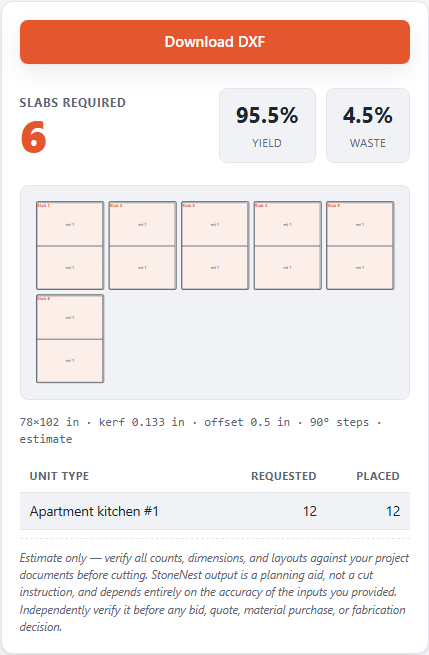
A 6-slab batch pulled from the Ridgeline Flats job for the saw.
What comes out of a batch
Every batch still goes through the same independent validator gate before it's allowed to export — checked for overlaps, off-slab placement, and kerf violations, whether it's a single 6-slab batch or the full job total. Once a batch clears, it exports as an AlphaCAM-ready DXF (R2018) ready for the saw. If you want to see how the yield math behind a batch is calculated, read the slab yield guide, or try it on your own job numbers and check pricing when you're ready for DXF import and export.
FAQ
Why does StoneNest nest in batches instead of the whole job at once?
Because that's how shops actually cut. Production floors stage and cut slabs in small groups of up to about 6 at a time, so StoneNest's nesting engine matches that batch window rather than laying out an entire job on one imaginary floor.
Does batching change the total slab count or yield?
No. The 108-unit, 3-unit-type Ridgeline Flats job still nests to 132 slabs at 81.6% yield. Batching changes how slabs are grouped for staging and cutting, not the underlying count or yield percentage.
Does every batch go through the same validation as the full job?
Yes. Each batch is checked by the same independent validator for overlaps, off-slab placement, and kerf violations before it can export as an AlphaCAM-ready DXF. There's no separate, looser path for smaller batches.
Is the 6-slab window a hard limit I can't change?
It reflects how a real shop stages and cuts slabs, matching staging racks and crew handling on the floor. Kerf, edge offset, and slab size are all editable fields, and you can try it at /try/ on your own numbers.
Related guides
Slab Yield Explained
What the yield percentage on a nested layout actually measures, and what a good number looks like on a real job.
Slab countHow Many Slabs Do You Need?
Why slab count isn't a flat square-footage ratio, and what actually drives the number on a real multifamily job.
Vein & rotationVein Direction & Rotation Policy
How free rotation, 90-degree-only, and Vein Flow aligned policies trade yield against the vein direction the customer sees.
See what your own job nests to
Try the free web estimator with your own unit counts, or start the 7-day free trial for full DXF import, export, and the validator gate.