Last updated
Vein direction and rotation policies in countertop slab nesting
A rotation policy controls whether the nester can spin a piece freely to close a gap, or has to keep it oriented so the stone's vein runs consistently across a run — and that single setting moves both yield and slab count. Free rotation packs tightest on paper; a 90-degree-only policy is a middle ground; Vein Flow aligned (or fully locked) protects the vein direction a customer will actually see across a run of countertops, at some cost to yield. On Ridgeline Flats — 108 units, 3 unit types — nesting held Vein Flow aligned still returned 132 slabs at 81.6% yield with a 0.133″ kerf, which is the trade-off in practice: alignment costs some yield, not the job.
What “Vein Flow aligned” actually means
Quartz and other engineered stone has a directional vein or pattern flow printed into the slab. When two pieces that will sit next to each other in the finished kitchen — an island and its return, or a run of base cabinet tops — are cut with their vein running the same way, the seam reads as one continuous surface. Rotate one of those pieces 90 degrees to save material and the vein direction breaks at the seam, which is the kind of thing a customer notices even if they can't name why it looks off.
A rotation policy is the rule a nesting engine follows when it's deciding how to orient each piece before it tries to pack them:
- Free rotation. The engine can spin any piece to any angle that improves packing. Tightest theoretical yield, but it will happily flip a piece 90 or 180 degrees if that closes a gap, with no regard for vein direction.
- 90-degree-only. Pieces can only rotate in 90-degree increments. Fewer packing options than free rotation, so slightly lower yield on average, but at least the vein still runs in one of two directions rather than any arbitrary angle.
- Vein Flow aligned or locked. Pieces that need to match — typically everything on one countertop run — are held to the same orientation and nested around that constraint instead of being rotated to save space. This is the policy that protects what the customer actually sees.
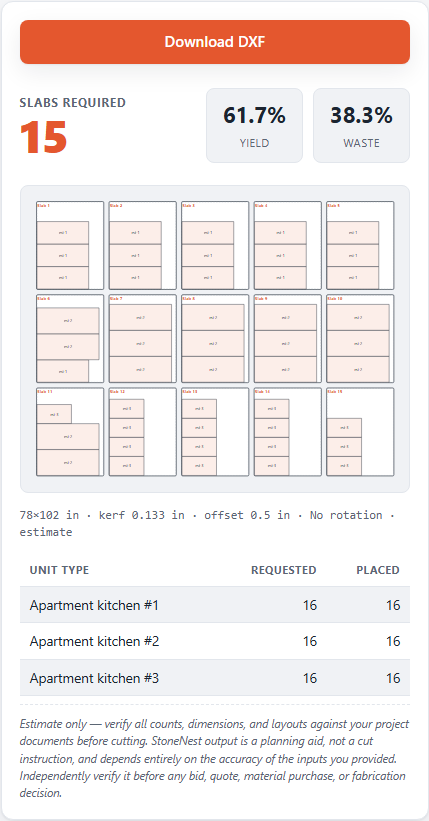
The Ridgeline Flats layout preview with pieces locked Vein Flow aligned rather than rotated freely to close gaps.
The trade-off: yield versus the seam a customer sees
Letting a nester rotate freely will, on most jobs, close a slab count down a little further than a policy that respects vein direction — that's the whole appeal of free rotation, and it's a legitimate choice on pieces where vein direction doesn't matter, like a splash strip that never sits next to another piece. But on the pieces that do sit together, a free-rotation policy is optimizing for a number on the results panel at the expense of a seam the customer will look at every day. See the slab yield guide for how yield percentage is calculated in the first place, and the slab count guide for how rotation policy fits alongside kerf and slab size as one of the inputs that sets the final count.
StoneNest lets the nest respect Vein Flow alignment rather than rotating pieces freely just to save a slab. On Ridgeline Flats that meant nesting to 132 slabs at 81.6% yield with pieces held to their vein orientation, not the lowest slab count a free-rotation pass could theoretically reach. The independent validator gate still checks every piece for overlap, off-slab placement, and kerf violations before it will let an export through, regardless of which rotation policy produced the layout.
Setting a rotation policy before you nest
Rotation policy is a setting you choose before nesting, alongside kerf (0.133″ default, editable) and edge offset (0.50″ default) — not something you fix after the fact. Try it against your own unit types with the desktop app's 7-day free trial (no card required), which handles up to 18 unit types and exports a validated, AlphaCAM-ready DXF once the layout passes. The web estimator at /try/ covers up to 3 unit types for a quick manual-entry check of count and yield, no DXF required. Full pricing and the Early Adopter rate are on the pricing page.
FAQ
What does Vein Flow aligned mean in slab nesting?
It means pieces that will sit next to each other in the finished kitchen — like an island and its return, or a run of base tops — are held to the same orientation on the slab so the stone's vein direction runs continuously across the seam, instead of being rotated to whatever angle packs tightest.
Does a stricter rotation policy always mean a lower yield?
Usually a small reduction, not a large one. On Ridgeline Flats — 108 units, 3 unit types — nesting held Vein Flow aligned still returned 132 slabs at 81.6% yield with a 0.133″ kerf, which is a workable trade against protecting the vein direction a customer will see.
Why not just let the nester rotate pieces freely and save a slab?
Free rotation optimizes for the lowest slab count on the results panel, but it will rotate a piece 90 or 180 degrees without regard for vein direction, which can leave the vein running two different directions across a seam the customer looks at every day. StoneNest holds orientation; it does not read the slab's photo, so it protects vein direction, not a matched pattern. StoneNest lets the nest respect Vein Flow alignment rather than chasing that smaller number.
Can I still get a validated export if I nest with a strict rotation policy?
Yes. Rotation policy only affects how pieces are oriented before packing — the independent validator gate still checks the resulting layout for overlap, off-slab placement, and kerf violations before allowing an AlphaCAM-ready DXF export, regardless of which policy produced it.
Related guides
Slab Yield Explained
What the yield percentage on a nested layout actually measures, and what a good number looks like on a real job.
Cutting setupKerf and Edge Offset
What kerf and slab edge offset actually are, why they have to be modeled inside the nest itself, and how getting them wrong quietly changes your slab count.
Production workflowThe 6-Slab Batch
Why production shops nest and cut a few slabs at a time, not the whole job at once.
FundamentalsWhat Is Slab Nesting?
The plain-English definition of slab nesting, why a square-footage guess isn't the same calculation, and where it fits in a real multifamily bid.
Edges & estimatingWaterfall Edges & Mitered Aprons
A waterfall leg is a full-height piece with nowhere else to come from. A vein-matched fold at the top constrains exactly where on the slab it can be cut.
See what your own job nests to
Try the free web estimator with your own unit counts, or start the 7-day free trial for full DXF import, export, and the validator gate.