Last updated
Kerf and edge offset: why your nest has to respect the saw
Kerf is the strip of material a blade actually removes with every cut, and slab edge offset is the clearance every piece must keep from the raw slab edge — and both have to be modeled inside the nest itself, not applied afterward, or the layout you get won't match what the saw can actually cut. StoneNest ships with a 0.133″ default kerf and a 0.50″ default edge offset, both editable, and both are subtracted from usable slab area before a single piece is placed — which is part of why the 108-unit, 3-unit-type Ridgeline Flats demo job nested to 132 slabs at 81.6% yield instead of a rounder, more optimistic number.
Two different clearances, both non-negotiable
Kerf and edge offset get lumped together in conversation, but they solve different problems on the slab:
- Kerf is the width of material a blade removes on every single cut — not a gap you leave, but stone that no longer exists once the cut is made. Every internal cut between two adjacent pieces consumes a kerf's worth of slab twice: once per edge. StoneNest's default is 0.133″, taken from an actual shop saw setting rather than rounded to an even number, and it's editable to match your own blade.
- Slab edge offset is the clearance every piece must keep from the raw, unfinished edge of the slab itself — separate from kerf, and applied whether or not a piece happens to sit near that edge. StoneNest defaults this to 0.50″, editable per job. To see what offset and kerf leave usable on a slab of any dimensions, the slab sizes reference works it through by material.
Both have to be modeled inside the nest, before pieces are placed — see the DXF-to-slab-count workflow for where this sits in the overall pipeline. If they're only applied as a rough deduction after the fact, the layout on screen doesn't match what the blade can actually produce.
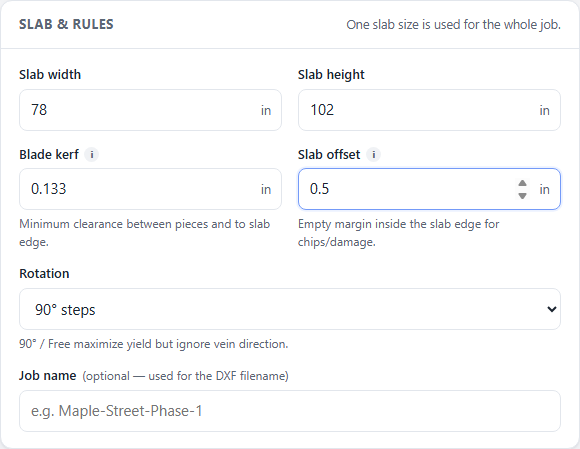
Kerf and edge offset settings next to the nested layout on the Ridgeline Flats demo job: 0.133″ kerf, 0.50″ offset.
What happens when kerf and offset are wrong
Get either number too small and the nest looks better than it is: pieces appear to fit tighter together and closer to the slab edge than the saw can actually deliver, which is how a layout clears a quick visual check but fails on the shop floor — a piece comes up short, or an edge is too thin to hold up under the blade. Get either number too large and you're leaving real yield on the table for no reason, opening slabs the geometry didn't actually require. Either way, the effect shows up in the yield percentage and the slab count together, not as a separate line item — which is why both settings live in the nesting engine itself rather than as a manual fudge factor applied to a finished layout.
Where these settings sit in your job
Kerf and edge offset are set once per job alongside slab size and rotation policy, then applied automatically to every piece the nest places — you're not entering them per piece. Rotation policy interacts with both: pieces that must stay Vein Flow aligned have fewer valid orientations to satisfy the same clearances, which can cost yield versus a free-rotation policy. Before a layout is allowed to export as an AlphaCAM-ready DXF, StoneNest's independent validator checks every placement against these exact numbers and refuses to export if it finds a kerf violation, an off-slab placement, or an overlap. Want to see the numbers a real job produced with these defaults in place? See how many slabs you need, or try your own quantities at /try/.
FAQ
What's the difference between kerf and edge offset?
Kerf is the material a saw blade physically removes with each cut, applied between every pair of adjacent pieces. Edge offset is a separate clearance every piece must keep from the raw, unfinished slab edge, regardless of where the nearest cut is. StoneNest defaults kerf to 0.133 inch and edge offset to 0.50 inch, and both are editable per job.
Can I change the default kerf and edge offset values?
Yes. Both are editable to any decimal value to match your own blade and shop practice. The 0.133 inch kerf and 0.50 inch edge offset are simply the values the shop that built StoneNest cuts to by default.
Does a wrong kerf setting actually change the slab count?
Yes. Kerf and edge offset are subtracted from usable slab area before pieces are nested, so a kerf or offset set too small overstates how much material is actually usable, and one set too large can force extra slabs the geometry didn't really need. On the 108-unit, 3-unit-type Ridgeline Flats job, the nest used the 0.133 inch default and returned 132 slabs at 81.6% yield.
How does StoneNest catch a kerf or offset violation before it reaches the saw?
An independent validator checks every placed piece against the job's kerf and edge-offset settings, along with overlaps and off-slab placement, and refuses to export the layout as an AlphaCAM-ready DXF if any violation is found. That check runs after every nest, not just on request.
Related guides
Slab Yield Explained
What the yield percentage on a nested layout actually measures, and what a good number looks like on a real job.
Vein & rotationVein Direction & Rotation Policy
How free rotation, 90-degree-only, and Vein Flow aligned policies trade yield against the vein direction the customer sees.
Slab countHow Many Slabs Do You Need?
Why slab count isn't a flat square-footage ratio, and what actually drives the number on a real multifamily job.
Material & estimating2cm vs 3cm & Slab Count
Everyone compares 2cm and 3cm on looks and price. The estimating question is different: a 2cm top built to read thicker needs buildup strips cut from the same slab.
See what your own job nests to
Try the free web estimator with your own unit counts, or start the 7-day free trial for full DXF import, export, and the validator gate.