Last updated
From DXF export to countertop slab count: how it works
Getting from a countertop DXF export to a bid-ready slab count takes three inputs — one DXF per unit type, a quantity for each, and your slab size, kerf, and edge-offset settings — and StoneNest turns those into a nested layout, an independently validated slab count and yield percentage, and an AlphaCAM-ready DXF, typically in 3–5 seconds for 1,200+ pieces. No re-drawing: it's the same DXF your ERP or CAD already exports.
The four-step path
- Export the DXF you already have. One file per unit type, from whatever ERP or CAD package your shop uses — no separate re-drawing step.
- Load unit types and set quantities. Up to 18 unit types on a licensed seat; each type gets its own quantity for the job.
- Set slab size, kerf, edge offset, and rotation policy. These are the real cutting constraints — StoneNest ships with a 0.133″ default kerf taken from an actual shop saw setting, and every field is editable.
- Nest, validate, and export. The nest runs, an independent validator checks for overlaps, off-slab placement, and kerf violations, and only a layout that passes is allowed to export as an AlphaCAM-ready DXF.
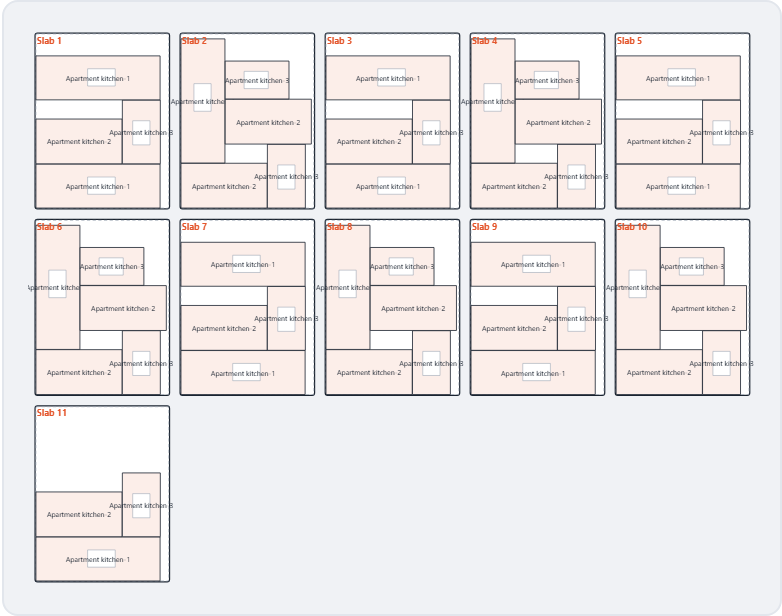
The validated, nested layout immediately before AlphaCAM-ready DXF export.
What the validator actually checks
StoneNest refuses to export a layout that fails validation. That check runs against every placed piece for overlaps, placement outside the slab boundary, and kerf clearance violations — before a DXF is ever produced, not after. On the 108-unit, 3-unit-type Ridgeline Flats demo job, the validated nest returned 132 slabs at 81.6% yield with 0 overlaps flagged in the final layout.
Where this fits with the rest of your workflow
StoneNest is built for the step before photo-matched slab layout, not as a replacement for it: a fast, conservative slab count and AlphaCAM-ready DXF you can put in a bid before committing the time to a full photo-layout. See how this applies at job scale in the multifamily estimating guide, or jump straight to trying it on your own numbers.
FAQ
Do I need to redraw anything to use StoneNest?
No. StoneNest reads the DXF your ERP or CAD already exports, one file per unit type — there's no separate re-drawing step before nesting.
What happens if my DXF has open outlines or extra geometry?
Clean, closed outlines nest most reliably. Malformed geometry is flagged rather than silently guessed at, so you know what to fix in the source file before re-exporting.
What comes out at the end?
A slab count, a yield percentage, a layout preview, and — once the layout clears the independent validator — an AlphaCAM-ready DXF export for the saw.
Does my DXF ever leave my PC?
No. StoneNest runs on your PC — there's no upload step, and your job files never leave your machine. The free web estimator at /try/ also runs client-side in your browser — what you enter is used only to compute your result.
Related guides
DXF Cleanup for Nesting
The pre-import checklist that keeps a DXF from failing silently.
Cut-safe nestingHow Layouts Are Validated
The second-opinion gate that blocks bad exports.
Cutting setupKerf and Edge Offset
What kerf and slab edge offset actually are, why they have to be modeled inside the nest itself, and how getting them wrong quietly changes your slab count.
FundamentalsWhat Is Slab Nesting?
The plain-English definition of slab nesting, why a square-footage guess isn't the same calculation, and where it fits in a real multifamily bid.
See what your own job nests to
Try the free web estimator with your own unit counts, or start the 7-day free trial for full DXF import, export, and the validator gate.