Last updated
How every layout is validated before it can export
A layout can't leave StoneNest until a second, independent check signs off on it. After the nester places every piece, the validator inspects the finished layout for overlaps, off-slab placement, and kerf-clearance violations. Find one and it refuses to export - no silent failure, just a specific message telling you what and where. On the Ridgeline Flats job, that's 132 slabs at 81.6% yield with 0.133″ kerf and 0.50″ edge offset, checked piece by piece before any AlphaCAM-ready DXF is written. The nester's job is to fit pieces tight. The validator's job is to make sure "tight" never becomes "touching."
The validator is a second opinion, not the nester
The nester's whole job is density - fit as many units as it can onto as few slabs as possible while respecting kerf. That's an optimization problem, and optimization problems can produce edge cases: a piece nudged a hair over a slab boundary, two pieces that clear kerf everywhere except one corner. Rather than trust the nester to grade its own homework, StoneNest runs a completely separate pass over the finished layout - the validator - that checks three things and three things only: does any piece overlap another, is any piece sitting off the slab, and does any pair of pieces violate kerf clearance. If the answer to any of those is yes, the export button does not produce a file. It produces a message telling you exactly which piece and where. See the DXF-to-slab-count guide for how the nester gets to a layout in the first place.
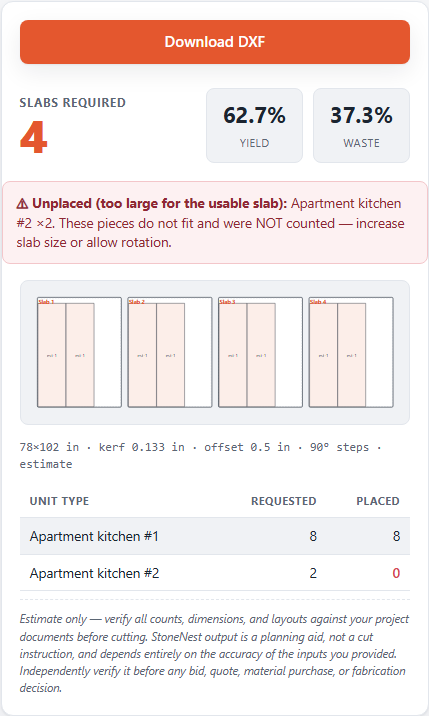
The validator flags a kerf-clearance violation on the Ridgeline Flats layout instead of letting it export.
Cut-safe by construction, not by hope
Here's the quotable version: an exported layout is one you can actually cut, because it's the only kind of layout the software will let out the door. There's no "usually fine" tier. A number that can't pass the check never leaves the app - it stays on screen with a violation message until it's fixed or the layout is re-nested. That's a very different promise than a nester that just reports a slab count and trusts you to eyeball the DXF for problems before it hits a machine. The validator doesn't care how good the yield percentage looks; it only cares whether the geometry is safe to cut, every time, for every slab in the batch (up to 6 slabs per run, up to 18 unit types per job).
Where this fits in the estimate
Validation happens on every run, not just the ones that look risky - a clean multifamily job with three unit types gets the same scrutiny as a tight custom layout. If you're estimating a bigger job first, start with the slab count guide or the multifamily estimating guide to see how slab count and yield get established before a layout ever reaches the validator. You can run a real job through the whole pipeline - nest, validate, export - with the 7-day free trial, no card required. Pricing and plan details, including the Early Adopter rate, are on the pricing page.
FAQ
What exactly does the validator check?
Three things on the finished layout: piece overlaps, any piece placed off its slab, and any kerf-clearance violation between pieces. If it finds any of the three, it blocks the DXF export.
Does the validator replace the nester?
No. The nester places pieces to maximize yield; the validator is a separate, independent pass that checks the result afterward. It's a second opinion, not a second nesting engine.
What happens when a layout fails validation?
Nothing exports. You get a specific message identifying which piece and which violation, instead of a silent failure or a DXF you'd only catch was wrong at the saw.
Does validation slow down every job, even simple ones?
It runs on every export, every time, regardless of job size or how confident the yield percentage looks - the check doesn't get skipped because a layout seems safe.
Related guides
Why Deterministic Nesting Matters
A bid is a promise - the slab count behind it should never change on its own.
Import prepDXF Cleanup for Nesting
The pre-import checklist that keeps a DXF from failing silently.
ComparisonNesting Software Comparison
A plain, side-by-side look at four real nesting options — what each one costs, what it actually does, and why the bidding-and-cutting slice of the job is the one StoneNest was built to own.
See what your own job nests to
Try the free web estimator with your own unit counts, or start the 7-day free trial for full DXF import, export, and the validator gate.