Get the StoneNest beta
Enter your email below and your download link appears right here on this page — a 7-day full-featured free trial: DXF import, DXF export, up to 18 unit types — no card required. We'll also email you a copy of the link to keep.
Start your free 7-day trial
Checking the current release…
Every build is code-signed
by STONENEST LLC (Certum). How to verify
your download →
StoneNest checks in when it launches and once a day while
open — license status, app version, and feature-usage counts only, never your
bids, drawings, or pricing. Offline? The app simply carries on unchanged.
Privacy policy →
What you'll get
- Double-click the downloaded .msix file and click
Install (the publisher line reads STONENEST LLC),
then open StoneNest — your 7-day full trial starts right there, nothing to activate
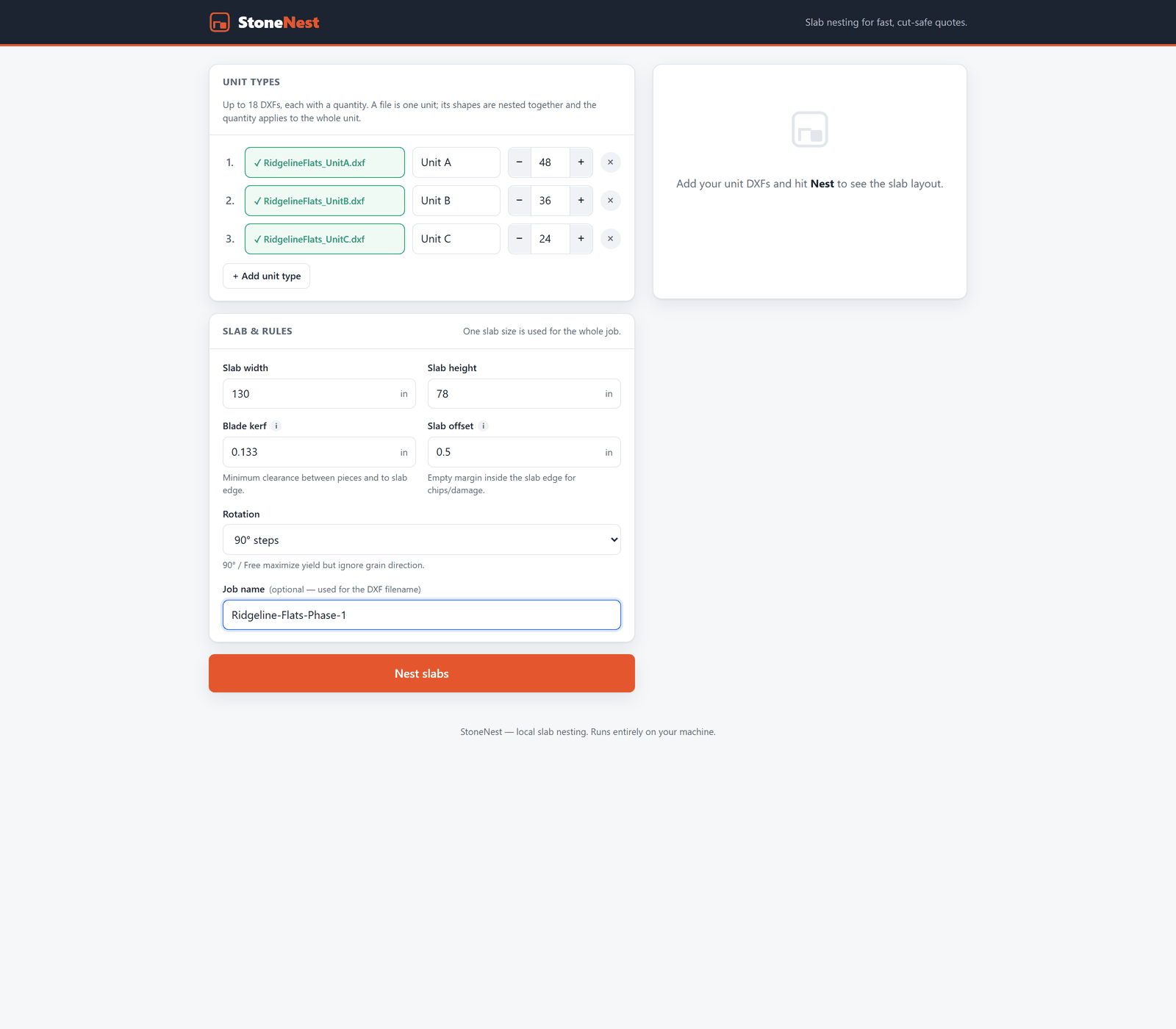 Screenshot placeholder screenshots/download-step-2.png Drop the real capture in at this path — the page picks it up automatically.
 - Drop in your unit DXFs, set quantities, hit nest — slab count, yield, and layout in seconds
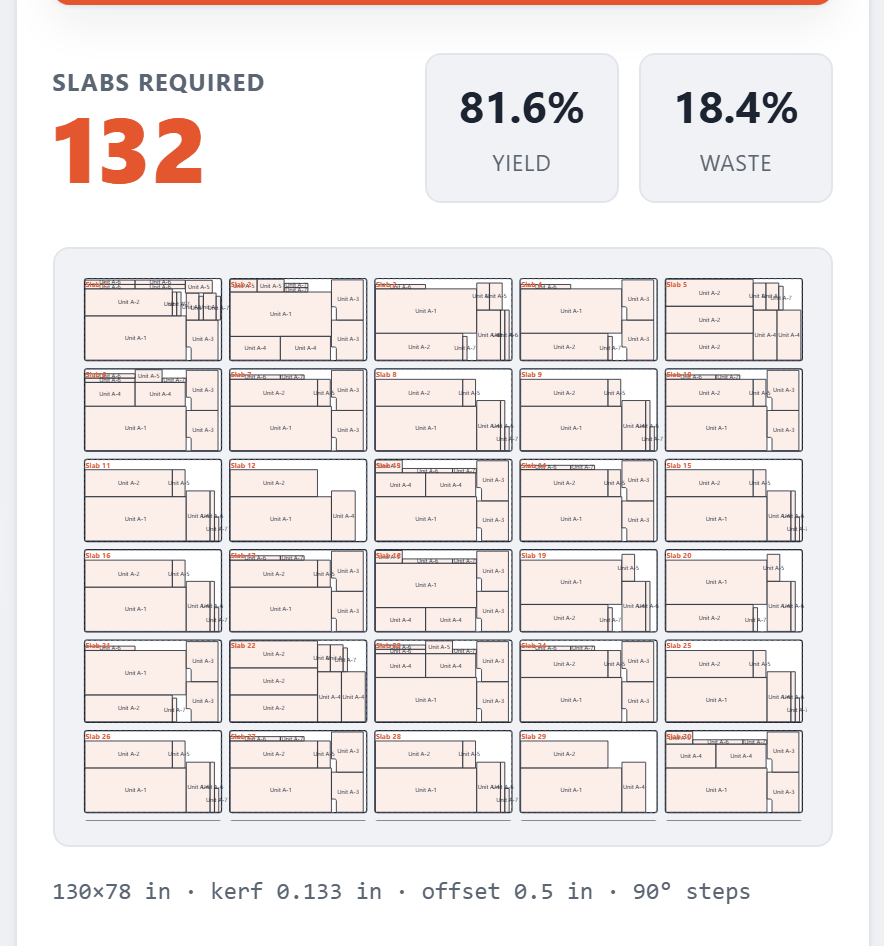 Screenshot placeholder screenshots/download-step-3.png Drop the real capture in at this path — the page picks it up automatically.
 - Export the AlphaCAM-ready DXF and take the count to your bid
Windows 10/11, 64-bit. WebView2 ships with Windows — nothing else to install. While your trial is issuing: try the estimator now →
What your browser will say — and why that's expected
This release is new, and browser reputation systems judge files by how many people have already downloaded them. Until enough shops have, Edge and Chrome both caution before saving it — that's a statement about the file's age, not its safety. Every build is code-signed by STONENEST LLC, the SHA-256 is published next to the download button above, and the warnings fade on their own as downloads accrue. Here is exactly what you'll see, click for click.
Microsoft Edge
- The Downloads flyout says the StoneNest installer “isn't commonly downloaded.”
Hover the entry and click the … button, then choose
Keep.
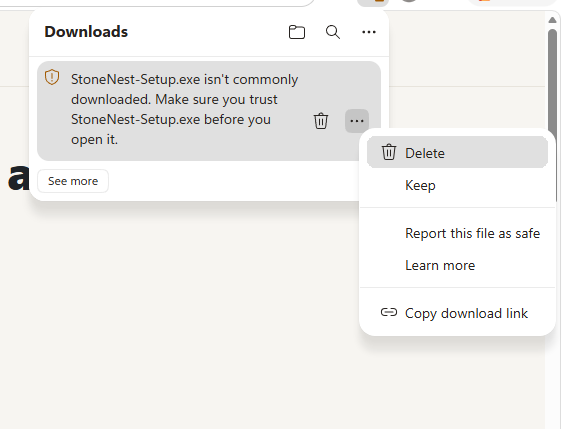 Screenshot placeholder screenshots/dl-edge-3-menu-keep.png Drop the real capture in at this path — the page picks it up automatically.
 - Edge double-checks. Read the Publisher line — it should say
STONENEST LLC; that's the code-signing certificate doing its job. Then
click the arrow on the Delete button and choose Keep anyway.
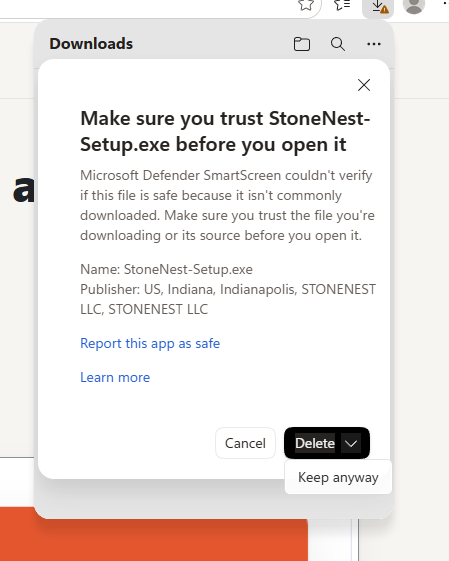 Screenshot placeholder screenshots/dl-edge-6-keep-anyway.png Drop the real capture in at this path — the page picks it up automatically.
 - That's it — the flyout now shows the file with Open file. Click Open file, check the publisher reads STONENEST LLC, and click Install.
Google Chrome
- The download bubble says “Suspicious download blocked.” Click the
› arrow on the entry.
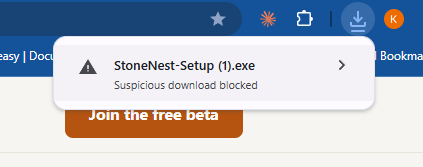 Screenshot placeholder screenshots/dl-chrome-1-blocked-bubble.png Drop the real capture in at this path — the page picks it up automatically.
 - Choose Download suspicious file — Chrome's wording for
“I trust this one.”
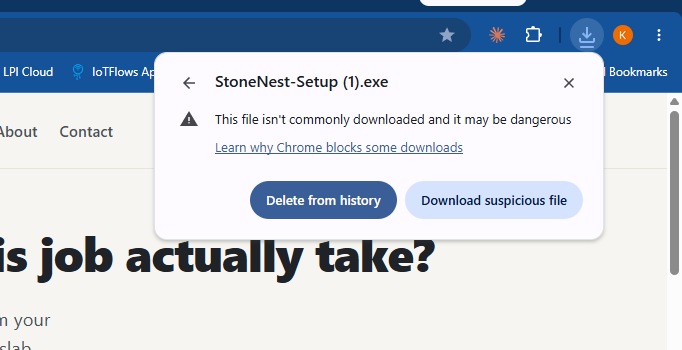 Screenshot placeholder screenshots/dl-chrome-2-download-anyway.png Drop the real capture in at this path — the page picks it up automatically.
 - Now open the file — keeping it doesn't run it. Click the StoneNest entry in the download bubble, or open your Downloads folder and double-click the StoneNest .msix file, then click Install.
Norton, McAfee, or another antivirus?
Some antivirus products add their own caution the first time you run a new installer — same reason as the browsers: the file is new to them, not unsafe. If yours interrupts the launch, look for Open anyway, Allow, or Run it anyway (Norton shows this under “More details”), and check the publisher reads STONENEST LLC before you approve it. If the antivirus quarantines the file instead, restore it from the antivirus's quarantine screen and run it again.
Want certainty instead of trust? Verify the file yourself: right-click the downloaded .msix file → Properties → Digital Signatures (signed by STONENEST LLC), or hash it and match the SHA-256 shown above. Full verification steps →