Last updated
How many slabs do you need for a countertop job?
The number of slabs a job needs is set by total countertop piece area, the yield your layout actually achieves, and how those pieces pack against your slab dimensions and kerf — not a flat square-footage-per-slab ratio. On a real 108-unit, 3-unit-type multifamily job (Ridgeline Flats), nesting the actual unit-type DXFs returned 132 slabs at 81.6% yield with a 0.133″ kerf — a count a simple sq-ft formula would not have produced, because it depends on how the real piece shapes pack, not an average.
What actually drives the number
Four inputs determine slab count for a real job:
- Total piece area. The combined square footage of every countertop, island, peninsula, and splash piece across every unit type and quantity — not one unit's area times the unit count (see the multifamily estimating guide for why that shortcut is wrong).
- Slab size. Standard slab dimensions set the usable canvas each piece has to fit into; a piece that's a few inches too long for one slab size can force an extra slab even at good yield — typical dimensions by material are in the slab sizes reference.
- Kerf and edge offset. Every cut removes a kerf width of material, and every piece needs clearance from the slab edge. StoneNest ships with a 0.133″ default kerf; a wider blade or edge offset lowers usable area and can push the count up.
- Rotation policy and piece mix. Whether pieces can rotate freely or must stay Vein Flow aligned changes how tightly they pack. A mix of large islands and small splash strips nests differently than uniform pieces.
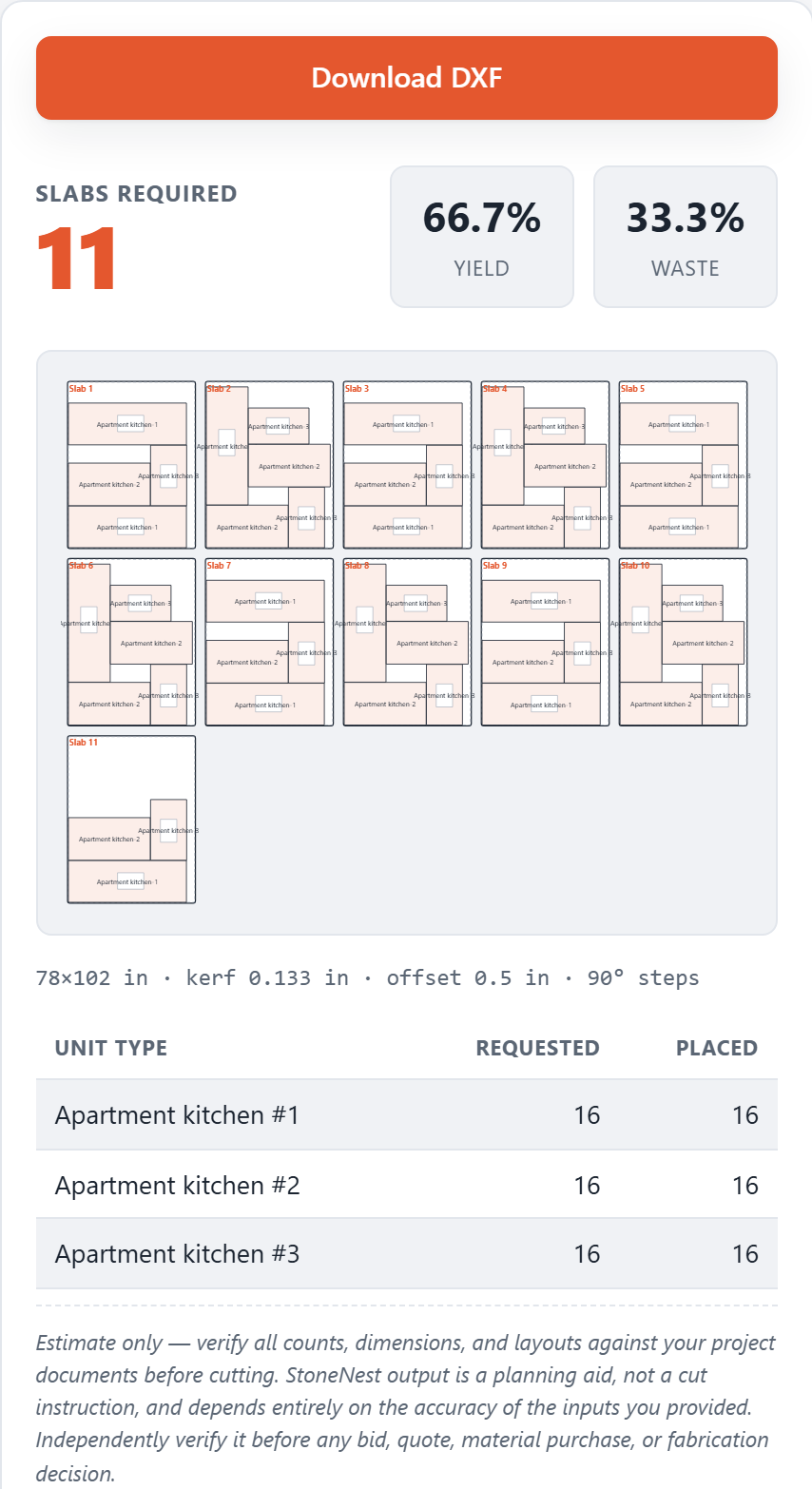
The results panel: the conservative slab count for a nested job, with every piece placed.
Why sq-ft-per-slab rules of thumb break down
A common shortcut is dividing total countertop square footage by an assumed usable square footage per slab. That works as a rough sanity check on a single kitchen. On a multifamily job with several repeating unit types, it stops being reliable: pieces from different units often share a slab, an oversized island can strand a slab's remaining area as unusable offcut, and a splash strip that doesn't fit anywhere else can force a slab open on its own. The only way to get a number you can put in a bid is to nest the actual piece geometry against real slab dimensions and kerf — which is the whole job of a nesting engine, not a takeoff spreadsheet.
Getting a slab count without a DXF yet
If you don't have unit DXFs handy, the free web estimator at /try/ lets you set up to 3 unit types and 100 quantity each and returns a slab count, yield percentage, and layout preview — ungated, computed in your browser, nothing uploaded. For a real DXF-based bid, the desktop app (7-day free trial, no card required) handles up to 18 unit types and adds the independent validator gate and AlphaCAM-ready DXF export. For an even faster back-of-envelope number — just total square footage, a slab size, and a yield assumption — the free slab calculator gets you a planning estimate in seconds.
FAQ
Is there a simple square-feet-per-slab number I can use?
Not a reliable one for a multifamily job. A rough single-kitchen sanity check might use 60-70 sq ft of usable slab area, but once you're nesting several unit types together the real number depends on how those pieces pack, which is why the 132-slab count on a 108-unit, 3-unit-type job (81.6% yield) came from actually nesting the geometry, not a formula.
Does slab yield percentage tell me how many slabs I need?
Yield tells you how efficiently a given layout used the slabs it was assigned — see the slab yield guide for the full explanation. You still need total piece area and slab size to get a slab count; yield is what you check after the fact to see how much of each slab is usable countertop versus waste.
Can I get a slab count without exporting a DXF?
Yes. The free web estimator at /try/ accepts manual entry (up to 3 unit types x 100 qty) and returns a slab count, yield percentage, and layout preview in your browser, no upload. Estimator Mode in the desktop app does the same, unlicensed, with no DXF import or export.
How is this different from a manual takeoff count?
StoneNest nests the actual piece shapes against your slab size, kerf, and edge offset, then runs the layout through an independent validator that refuses to export if it finds an overlap, off-slab placement, or kerf violation — a check a manual takeoff doesn't have.
Related guides
Kerf and Edge Offset
What kerf and slab edge offset actually are, why they have to be modeled inside the nest itself, and how getting them wrong quietly changes your slab count.
Production workflowThe 6-Slab Batch
Why production shops nest and cut a few slabs at a time, not the whole job at once.
MultifamilyMultifamily Countertop Estimating
Why multifamily bids nest by unit type and quantity, not by multiplying one kitchen's square footage by the door count.
Free estimatorTry It Walkthrough
What the three sample unit packages in Try It are, how to read the slab-count-and-yield results panel, and when a job needs the full validated desktop workflow instead.
Multifamily estimatingSlab Count by Building Size
Why a bigger building isn't a bigger multiplier: the method that sizes a 50-, 100-, or 200-unit job from its unit mix, walked through on a real 108-unit job.
See what your own job nests to
Try the free web estimator with your own unit counts, or start the 7-day free trial for full DXF import, export, and the validator gate.