Last updated
How to read the Try It estimator results
Try It (stonenest.app/try/) is StoneNest's free web estimator: three real, anonymized apartment unit packages are already loaded, you set a quantity for each — up to 100 units per package — and the browser computes a slab count, a yield percentage, and a layout preview instantly, with nothing uploaded. It's a fast sanity check, not a bid-ready number: Try It caps out at 3 unit types, takes no DXF files of your own, and doesn't run past the independent validator that gates a real export. The full nesting engine behind that validated count — the one that returned 132 slabs at 81.6% yield on a real 108-unit, 3-unit-type multifamily job at a 0.133″ kerf — lives in the desktop app, free to try for 7 days with no card required. Read the Try It results panel as “does this shape look right before I load my own files,” not as the number that goes into a bid.
What's actually loaded when you open Try It
Try It doesn't ask you to upload anything on your first visit — it opens with three real apartment unit packages pulled from an actual multifamily bid, with identifying details removed. Each package has a quantity field you can set from 1 up to 100; set the quantities you want to test, click estimate, and the browser nests those pieces and returns a result. Nothing you type is sent anywhere — the whole calculation runs client-side, the same privacy stance as the desktop app: your job files never leave your machine. If you just need a rough number from total square footage instead of unit types, the standalone slab calculator does that arithmetic in a few seconds; Try It is the tool for when you're thinking in unit types and quantities, closer to how a real multifamily job gets estimated — see how many slabs you need for what actually drives that number.
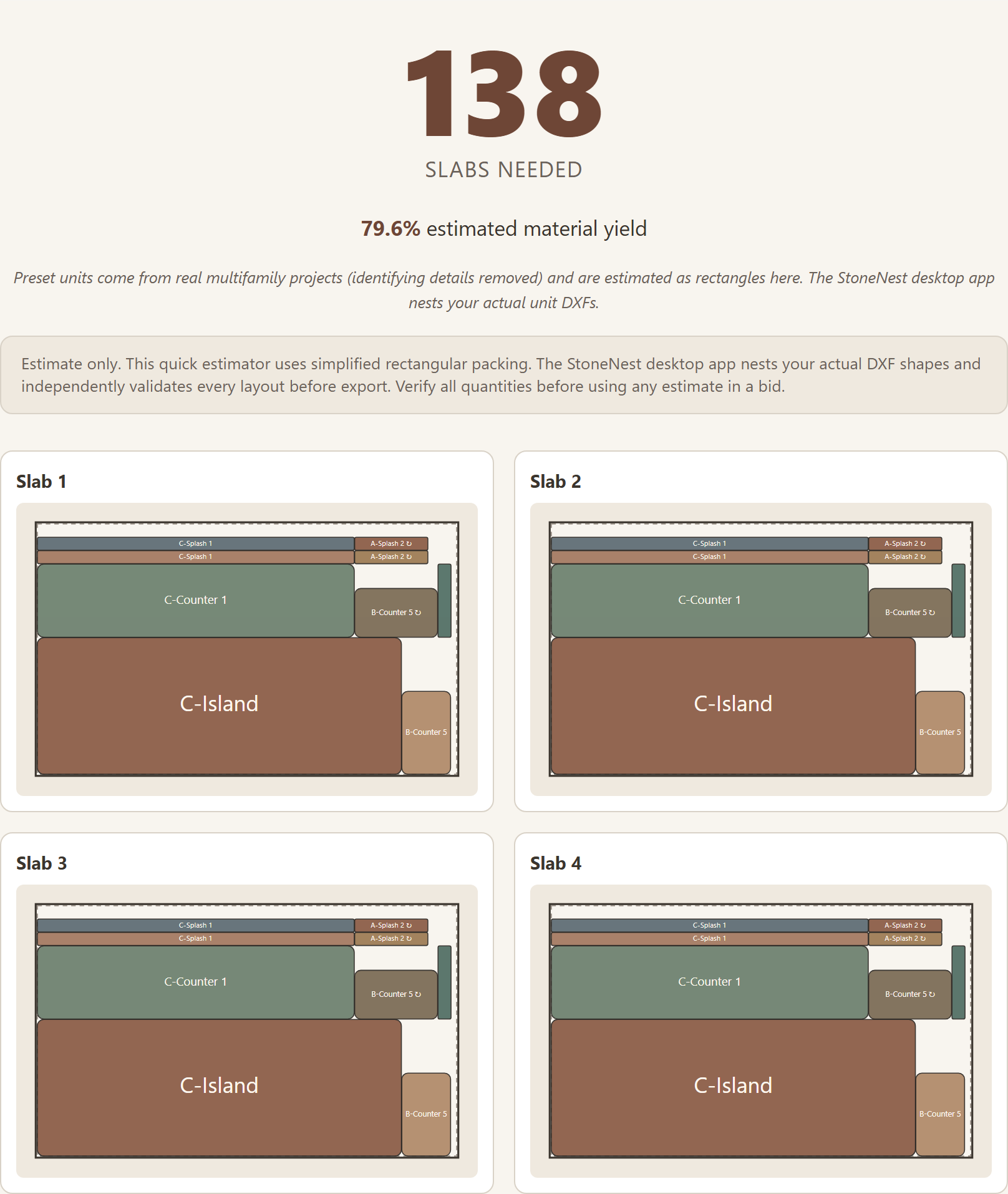
The Try It results panel after estimating a sample apartment unit package: slab count, yield percentage, and the layout preview, computed client-side in the browser.
Reading the three numbers on the results panel
After you hit estimate, three things come back:
- Slab count. How many slabs the quantities you entered would need, given the pieces nested together rather than each package priced in isolation — see multifamily countertop estimating for why that packing effect matters on a real job.
- Yield percentage. How much of the slab area the nested pieces actually use. Slab yield explained covers what a good yield number looks like and what moves it up or down.
- Layout preview. A visual nest of the pieces on a slab, so you can see the packing rather than just trust a number.
Try It runs on fixed kerf and edge-offset defaults rather than editable fields — see kerf and edge offset for what those settings do and why the full app lets you tune them per job.
When Try It isn't enough — and what is
Try It is deliberately capped: 3 unit types, the built-in sample packages only, no DXF import or export, and no independent validator gate checking the result for overlaps, off-slab placement, or kerf violations. That's the right amount of tool for a first look at whether your numbers are in the right neighborhood. It's not the tool for a number you hand to a GC.
The desktop app is the full workflow: load your own unit-type DXFs (up to 18 unit types), set your real slab size, kerf, edge offset, and rotation policy, and get a slab count and yield that has to clear the same validator gate before it can export as an AlphaCAM-ready DXF. On a real job like that — 108 units across 3 unit types — the engine returned 132 slabs at 81.6% yield. Start with the 7-day free trial, no card required, or see the Early Adopter rate on pricing.
FAQ
What does the Try It estimator actually do?
Try It loads three real, anonymized apartment unit packages, lets you set a quantity from 1 to 100 for each, and computes a slab count, a yield percentage, and a layout preview in your browser when you click estimate. Nothing you enter is uploaded.
How do I read the slab count and yield numbers?
Slab count is how many slabs your entered quantities would need once the pieces are nested together, not priced package by package. Yield percentage is how much of that slab area the nested pieces actually use. The layout preview shows the packing itself so you can see the result, not just the number.
Can I use my own unit files in Try It?
No. Try It works only with its three built-in sample unit packages and up to 100 quantity each. Loading your own unit-type DXFs, up to 18 unit types, requires the desktop app, available on a 7-day free trial with no card required.
Is the Try It result the same as a validated, exportable count?
No. Try It is a fast sanity check with no DXF import or export and no independent validator pass. A validated count that can export as an AlphaCAM-ready DXF only comes from the desktop app, where every layout is checked for overlaps, off-slab placement, and kerf violations before export is allowed.
Related guides
How Many Slabs Do You Need?
Why slab count isn't a flat square-footage ratio, and what actually drives the number on a real multifamily job.
Slab yieldSlab Yield Explained
What the yield percentage on a nested layout actually measures, and what a good number looks like on a real job.
MultifamilyMultifamily Countertop Estimating
Why multifamily bids nest by unit type and quantity, not by multiplying one kitchen's square footage by the door count.
See what your own job nests to
Try the free web estimator with your own unit counts, or start the 7-day free trial for full DXF import, export, and the validator gate.